![Logo-RETR-300x300-1.png]](https://kb.retr.app/hs-fs/hubfs/Logo-RETR-300x300-1.png?width=60&height=60&name=Logo-RETR-300x300-1.png)
RETR’s Gains and Losses tracker shows which loan officers (LOs) have joined or left a mortgage company, and where they came from or went. It appears at the top of every mortgage company profile in RETR.
What Is the Gains and Losses Tracker in RETR?
The Gains and Losses tracker is a section at the top of each mortgage company profile. It shows:
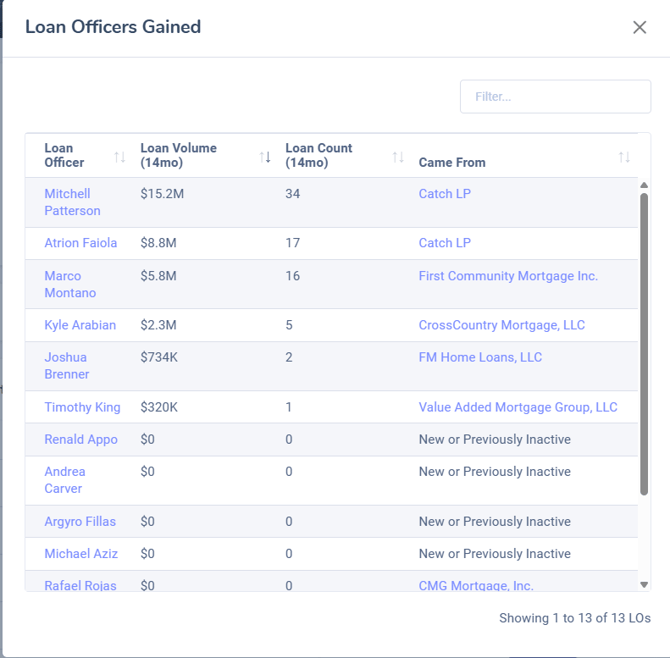
- Gains: LOs who joined the company, and the company they came from
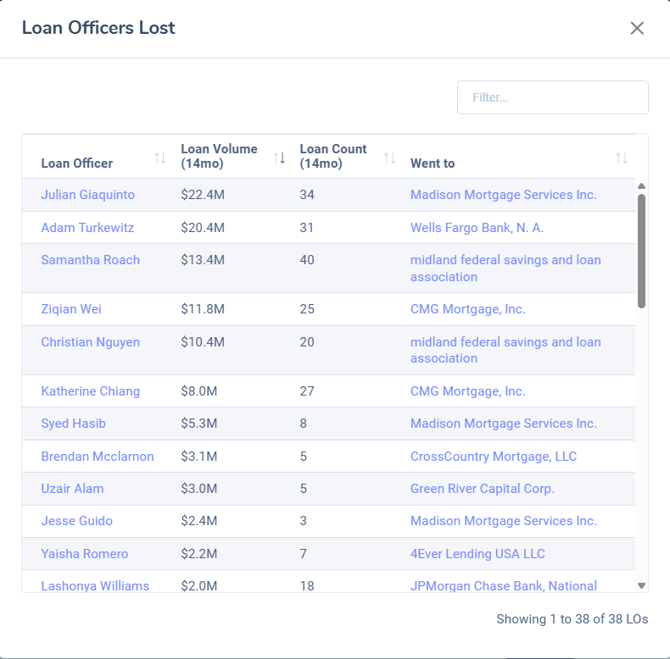
- Losses: LOs who left the company, and the company they moved to

How to View LO Gains and Losses for a Mortgage Company
Step 1: Open a mortgage company profile
Either search a mortgage company by name, or click on one from an individual profile or from search results. For a full breakdown on seraching mortgage companies in RETR, click here: How to Search Mortgage Companies, Brokers, and Credit Unions in RETR
Step 2: Find the Gains and Losses tracker
The Gains and Losses section is at the top of the profile.
Step 3: Open the Gains or Losses list
Click Gains to see LOs who joined the company and where they came from. Click Losses to see LOs who left and where they went.
Step 4: Open an LO’s profile
Click any LO in the list to open their profile. From there, you can add them to your own lists for outreach or look at their details.
What Can I Do With the Gains and Losses Tracker?
- ✅ You can see LO gains and losses on every mortgage company profile
- ✅ You can see where each LO came from or moved to
- ✅ You can open each LO’s profile and add them to your lists
- ❌ You cannot export Gains and Losses lists at this time
- ❌ You cannot see Gains and Losses on real estate office profiles
Note: Gains and Losses lists can’t be exported yet. We’re working on it. For now, open an LO’s profile from the list to add them to your own lists.