![Logo-RETR-300x300-1.png]](https://kb.retr.app/hs-fs/hubfs/Logo-RETR-300x300-1.png?width=60&height=60&name=Logo-RETR-300x300-1.png)
RETR doesn’t provide buyer contact information, only buyer names, for privacy reasons. To look up a buyer’s contact details, click a property address in RETR, then click the buyer’s name to run a search on TruePeople. For bulk buyer contact data, contact RETR’s partner, Versium.
Does RETR Provide Buyer Contact Information?
No. For privacy reasons, RETR only shows buyer names, not their phone numbers, emails, or other contact details.
- ✅ You can see buyer names on properties in RETR.
- ✅ You can search for a buyer’s contact information on TruePeople from RETR.
- ❌ You cannot get buyer contact information directly from RETR.
How to Look Up a Buyer’s Contact Information
Step 1: Click a property address
In RETR, click any property address. A pop-up opens with the buyer’s name.
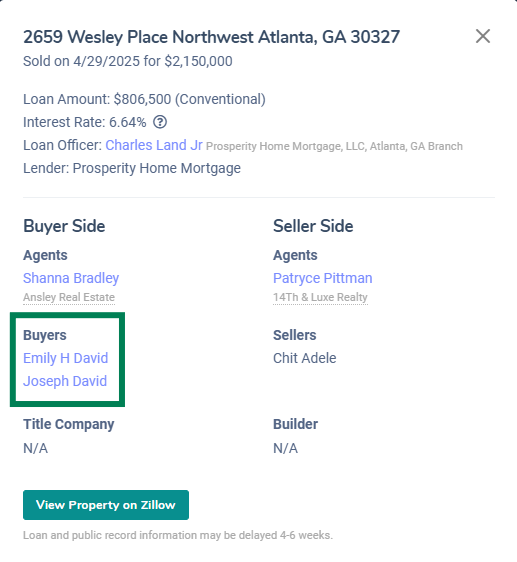
Step 2: Click the buyer’s name
Click the buyer’s name in the pop-up. You’ll be taken to TruePeople.
Step 3: Search for contact details on TruePeople
Run a search on TruePeople to find the buyer’s contact information.
Note: RETR can’t guarantee that TruePeople’s information is available or accurate. Use it as a starting point for finding buyer contact details.
How Can I Find Buyer Contact Information in Bulk?
For bulk buyer contact information, contact RETR’s data partner, Versium:
| Contact | Details |
|---|---|
| Name | Jesse Mayor, Versium |
| jmayor@versium.com | |
| Phone | 206-569-5909 |
Is Buyer Contact Information Run Through "Do Not Call" Lists?
We recommend checking your local laws regarding Do Not Call (DNC) for B2B calls. The numbers are not automatically checked again any particular list or database in that regard.