![Logo-RETR-300x300-1.png]](https://kb.retr.app/hs-fs/hubfs/Logo-RETR-300x300-1.png?width=60&height=60&name=Logo-RETR-300x300-1.png)
When you add an agent to a list from a sales area search, RETR adds the agent’s full 12-month nationwide production data, not the numbers from your sales area search. That’s why the numbers on your list or export can differ from what you saw in your search results.
Why Do an Agent’s Numbers Change When I Add Them to a List?
A sales area search shows each agent’s production inside the area you searched. When you add that agent to a list or export them, RETR uses the agent’s 12-month nationwide production, so the numbers usually change.
This is intentional. The sales area search helps you find agents who match your criteria. The list and export then give you each agent’s complete 12-month nationwide production data.
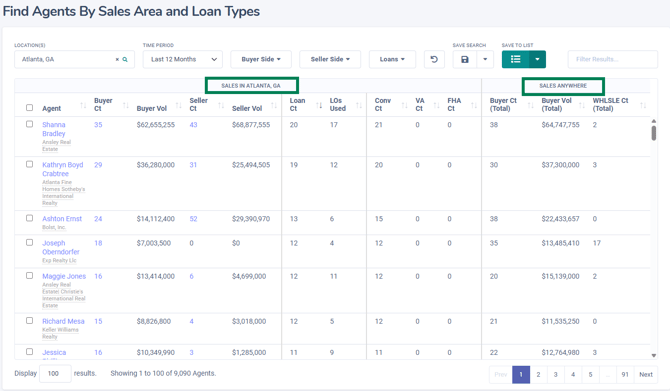
How to Tell Sales Area Data From Nationwide Data in Search Results
Agent search results show two columns of production data:
- Sales area column: production inside the area you searched
- “Sales Anywhere” column: the agent’s nationwide production. This is the data that goes to your list and export.
Can I Export Sales Area Search Data From RETR?
No. Here’s what you can and can’t do with sales area search data:
- ✅ You can save specific searches
- ✅ You can add agents to a list and export their 12-month nationwide production data
- ❌ You cannot export saved searches
- ❌ You cannot add sales area–specific data to a list
Note: There is currently no option to export or add sales area–specific production data to a list. RETR is always improving based on user feedback and hopes to offer more flexibility with exportable data in a future update.