![Logo-RETR-300x300-1.png]](https://kb.retr.app/hs-fs/hubfs/Logo-RETR-300x300-1.png?width=60&height=60&name=Logo-RETR-300x300-1.png)
RETR gives you contact information for real estate agents and loan officers (LOs) where available. You can see it on their profiles, and every data export includes it. It does not appear in search results or on lists.
What contact information does RETR provide?
RETR provides contact details for agents and loan officers:
| Contact type | Agents | Loan Officers |
|---|---|---|
| Email address | Work and personal email addresses | |
| Phone | Phone number | Work and personal phone numbers |
How to View Agent and Loan Officer Contact Information
Step 1: Search for the agent or loan officer
Use RETR search to find the agent or LO you want.
Step 2: Open their profile
Click the agent’s or loan officer’s name to open their profile.
Step 3: View the contact details
- Agents: The contact information appears right on the profile.
- Loan officers: Click the “Contact Information” button to see their details.
Note: You need the LO Recruit add-on to view and export loan officer contact information. Learn more: What Is the LO Recruit Add-on in RETR?
Does contact information show up on lists?
No. When you add agents or loan officers to a list, their contact information won’t show in the list view. It is always included when you export the list.
Where can I see contact information in RETR?
- ✅ You can see contact information on agent and loan officer profiles
- ✅ You can get contact information in every data export
- ❌ You cannot see contact information in search results
- ❌ You cannot see contact information in the list view
Are there any other spots where I can see and export agent/LO contact information?
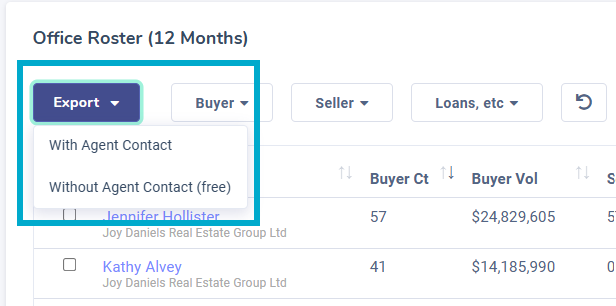
Yes! On company rosters (both for real estate and mortgage companies), you can view and download company rosters. These rosters will have the option of either exporting with or without agent/LO contact information. Be sure you're selecting the correct option.
Does RETR provide contact information for buyers or mortgage companies?
No. RETR doesn’t provide contact information for buyers/borrowers or mortgage companies.
For privacy reasons, RETR shows buyer names only, not phone numbers, emails, or other contact details. You can find buyer names in two places:
- Transaction History exports
- The property details page (click a property address)
If you need buyer emails and phone numbers, RETR offers a third-party option: How to Find Buyer Contact Information in RETR
What if there is no contact information available for an agent/LO?
While RETR uses multiple data sources to source the most accurate data possible, we make no guarantees on the accuracy or availability of that data.
For contact information, we run regular data checks to update this information when it changes, for example when an agent or loan officer leaves one company for another. However, if other factors exist, such as the new email address not being publicly available, then we may not be able to receive that update right away or at all.
No data platform is perfect; however, RETR will continue to improve our data providers to provide the most accurate data possible. It is for that reason that RETR is often cited by users as the most accurate platform for loan officers.